Sunday, December 7, 2014

My Journey Through Assistive Technology

I began this blog with very limited knowledge on the use of assistive technology and how to create an atmosphere of universal design for learning (UDL) in my classroom. Throughout my research and experiences with AT, I have discovered:
  • How to structure a UDL lesson by referencing specific guidelines and incorporating a variety of AT devices
  • Potential barriers that students in my class might face without the use of AT
  • Computer accessibility for users with disabilities to help them achieve success in the classroom
  • Information on the AT assessment process and AT consideration in the IEP process
  • Common types of AT used in the classroom (low-tech, mid-tech, high-tech)
  • AT support devices for reading, writing, and communication
  • AT support devices for math
  • AT accommodations for college students
  • Achieving independence at home, at work, and in the community with the use of AT and augmentative communication devices
  • As technology develops and changes, AT will constantly be changing
  • Teachers need to make sure they are always researching the new and improved ways of AT 
Within my inclusive third grade classroom, I have a wide range of student ability levels. After completing this blog, I feel that the use of AT can benefit all of my students, regardless of if they have an identified learning disability. Knowing all of the information above will allow me to consider, evaluate, plan, and implement AT devices effectively during my instruction. The AT possibilities are endless, and giving students the opportunity to use them will facilitate both academic and social success in education and in their life.

Achieving Independence in Home, Work, and Community Settings

Students with disabilities who are not planning to attend college also need to develop the necessary skills to transition from high school to adult life. Students who have autism, cognitive disabilities, or multiple disabilities need to be able to achieve independence in the home, community, and at work. AT can help these students develop skills for living and working in the community.

Below are a variety of AT devices that can be used to teach functional skills.

Laureate Learning
  • My House: Language Activities of Daily Living
    • Teaches students vocabulary for items in 6 rooms of a typical home (living room, dining room, kitchen, bedroom, bathroom, utility room)
    • Teachers can select vocabulary to meet students' ability levels
    • My School and My Town are similar programs that focus on vocabulary that students are likely to encounter and use in their schools and communities

Attainment Company
  • First Money
    • Teaches students to identify money names and values
  • Spending Money
    • Students go from store to store to buy items on a shopping list
  • Making Change
    • Students act as a store clerk and practice making change
  • Time Scales
    • Students learn about hours in a day, minutes of the hour, and moving from time to time on a clock
Conover Company
  • Functional Skills System
    • Teaches students the reading of signs
Visual Supports
  • Picture Schedule/Activity Sequences
    • Sequential, pictorial representations of events or tasks that signal a student to complete them


Social Stories
  • iCommunicate/Boardmaker
    • Teacher or parent authored short stories written to help a student learn social information that he/she may be lacking
Simple Technology for Self-Care and Leisure Activities
  • Adapted Switches
    • These switches can be connected to tabletop appliances (hair dryers, fans, kitchen mixers, etc) to allow for students to use them

Resource: Dell, A., Newton, D., Petroff. (2012). Assistive technology in the classroom: Enhancing the school experiences of students with disabilities. Boston, MA: Pearson Education, Inc.

AT Accommodations for College Students

Throughout my blog, I've included many AT accommodations for students in the primary grades. However, I've left out an important population... college students! Once a student graduates from high school, the AT device he/she uses should not disappear. The number of students with disabilities attending college has significantly increased over the past decade. These students often times face obstacles when completing college-level work. AT can help these students during classes, testing situations, and in completing assignments.

Below are some accommodations for college students with disabilities (depending on the task):

Task
Assistive Technology Accommodation
Note Taking
-    Using a potable note taker
-    Using a smart pen to record lectures
Taking Tests
-    Word processing application for essay exams
-    Text-to-speech software for reading support
Accessing Course Materials
-    Captioned videos
-    Providing handouts in electronic format
Reading
-    Books in alternative formats
-    Scan/read systems with highlighting and text-to-speech
-    Audio books
Completing Assignments
-    Screen magnification applications
-    Screen-reading applications
-    Text-to-speech
-    Word prediction software
-    Graphic organizers

AT Implementation Resource #2

Making It Work: Effective Implementation of Assistive Technology Guide
The SET site provides a guide for implementing a wide variety of AT effectively for students with special needs. It divides the implementation process into 7 steps and includes samples of specific tools used.

Below are the 7 steps that can be downloaded for free on the site:
  1. Gather Relevant Information
  2. Establish IEP Goals
  3. Conduct AT Trials
  4. Identify AT Solutions
  5. Develop AT Implementation Plan
  6. Adapt Lessons for Technology Integration 
  7. Follow Up and Plan Transition 

Keep in mind that truly successfully AT implementation into a student's school program does not necessarily depend on the device being used, but the careful consideration and attention to all of the implementation steps listed above.

AT Implementation Resource #1

AT Implementation: Working Together to Make a Measurable Difference
This resource provides a complete instructional module on the implementation of AT for people who are or will be involved in AT implementation or decision making. The module focuses on planning for the use of AT devices and services that are needed for students to participate and progress within the general education curriculum.

Objectives
Participant will learn:

  • Purposes/results of AT
  • Big ideas in AT implementation
  • Planning for AT implementation
  • Evaluating the effectiveness of AT implementation


Supporting Augmentative Communication and Meeting the Demands at Home and in the Community

Supporting AC Communication at Home
In addition to using an AC device at school, students need to also use their device at home. Doing this reinforces communication skills learned in school and helps students practice and apply them to an at-home setting. Teachers must ensure that students are using their AC devices within their home and among family members. Some AC systems can be complicated to operate. Trainings must be offered to family members, so that they understand how the specific AC device is used. Keeping explanations simple and clear is also crucial. Teachers as well as families need to understand the impact an AC system will have on a student's future success.

Supporting AC Communication in the Community
It becomes more difficult to involve community members in the use of a student's AC device. Unlike families and teachers who are interested in making sure the device is successful, the community may be less willing to accept an unfamiliar communication device. School wide activities, assemblies, and field trips (organized by the teacher) can promote positive feelings about AC use in the community.


Resource: Dell, A., Newton, D., Petroff. (2012). Assistive technology in the classroom: Enhancing the school experiences of students with disabilities. Boston, MA: Pearson Education, Inc.

Augmentative Communication and the IEP

Augmentative communication evaluations and considerations should be a component of the IEP development process. For non-speaking students, AC evaluations should also be considered. If deemed necessary for a student, AC components need to be outlined within the IEP.

Tips for integrating AC into an IEP:

  • IEP should include the use of the AC system within the student's educational program
  • The student needs to be provided with opportunities to practice communication skills within his/her educational environment
  • Goals and objectives must reflect the continued development of the AC system
  • The use of the AC system must be integrated within and across the school day, including both instructional and non-instructional periods
  • Continued collaboration among IEP team members

Saturday, December 6, 2014

Learned Helplessness

Beginning users of augmentative communication (AC) are often unskilled in active participation and become passive learners. These students sometimes feel a sense of dis-empowerment, believing they have no control over their environment. It is important that teachers identify this feeling of learned helplessness within their students and provide them with a voice and support to overcome their own passive responses.

Tips for overcoming learned helplessness:
  • Build a daily expectation of communication through specific activities such as choosing the activity during recess, picking a book to read, or identifying where to eat lunch
  • Construct a brief daily report to parents that is communicated by the student
  • Allow natural consequences to occur and provide avenues for repair
  • Provide for choice making whenever possible that requires the student to use his or her AC system
  • Provide powerful phrases on the device for students to reject or protest something

Resource: Dell, A., Newton, D., Petroff. (2012). Assistive technology in the classroom: Enhancing the school experiences of students with disabilities. Boston, MA: Pearson Education, Inc.

Illuminations

Illuminations is a website that is available for students who benefit from extended practice, visual representation of concepts, and/or interactive activities. This program offers numerous standards-based online activities for teaching and learning mathematics. It includes engaging tools for students and instructional support for teachers. The goal of Illuminations is to support the development of math concepts for students in grades K-12.

Resources include:


Resource: Illuminations. NCTM. Retrieved from http://illuminations.nctm.org/

The National Library of Virtual Manipulatives

The National Library of Virtual Manipulatives offers virtual manipulatives (physical objects that help students visualize relationships and applications) to assist students with math instruction. The use of manipulatives provides students with a concrete representation of a concept and allows active engagement to occur.


Resource: (1999-2014). The National Library of Virtual Manipulatives. Utah State University. Retrieved from http://nlvm.usu.edu/en/nav/vlibrary.html

Low-Tech and Mid-Tech Adaptations for Teaching Math

Listed below are some low-tech and mid-tech devices for teaching math:

Fraction Rubber Stamps


Manipulative Number Line
Laminated Addition and Multiplication Tables


Large Calculators with Over-sized Buttons


  • Useful for students who lack fine motor control


See n' Solve Calculators

  • Displays the entire math problem on the screen
  • Allows students to see their work as they solve computation problems with whole numbers and/or fractions


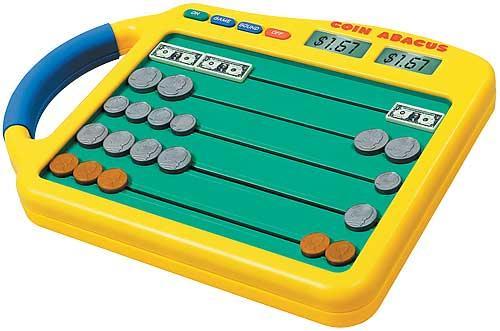
Coin Abacus and Coin-u-lator 

  • Includes keys that are shaped and sized just like real-life coins
  • Designed to teach basic money counting


Teaching Math Concepts, Math Skills, and Problem Solving

The following resources provide opportunities for additional engagement, practice, and instruction to build math concepts, skills, and problem solving. Each program includes features targeted at supporting both general education students, as well as students with disabilities. These applications are designed to make math more accessible for these students.

Math Playground
This is a popular math site filled with games, logic puzzles, step-by-step instructional videos, math practice, and a variety of problem solving activities. This program provides students with a safe place to learn and explore math concepts.


Destination Math
This is a highly interactive web-based learning environment that targets the development of skills in math reasoning, conceptual understanding, and problem solving for students in grade K-12. The program includes step-by-step instruction and opportunities for students to practice their problem solving skills. There is also a Spanish version of Destination Math to support ESL students.


Other math applications to explore:

Addressing Visual-Spatial/Motor Control Difficulties

Students with visual-spatial or motor difficulties may have difficulty with writing numbers, aligning digits when computing problems (adding/subtracting/multiplying, dividing), and/or creating visual representations (shapes, angles, etc). These types of disabilities may result in written work that is illegible, digits written in the wrong place-value position, and unrecognizable geometric figures. Even if these students have developed automaticity and fluency with numbered facts, they may face obstacles at arriving at the correct answer because of visual-spatial and motor difficulties. Below are education applications that address visual-spatial and motor control difficulties:

MathPad
This is a talking math program that allows students to perform basic operations on the computer in the same way as they would when using a pencil and paper.


Virtual Pencil
This application is designed to help students who are unable to operate pencil effectively. The program also offers speech feedback to assist those students with visual impairments and a "tutor" who informs students of what steps still need to bee completed to solve a problem.

Number Navigator 
This free program is for students who need a simple math processor to create mathematical equations. Students are able to enter and solve basic math problems on the computer.

Educational Applications to Address Automaticity/Math Fact Fluency

During my mathematics instruction, I have found that some of my students continue to struggle with math automaticity and fluency. Knowing math facts is similar to knowing sight words when reading. It frees up the mind to be able to solve real-world math problems. When students are not able to solve basic math facts quickly and with ease, they have difficulty solving higher-level math concepts. Following are some educational applications that I would like to incorporate during my math instruction that can strengthen student automaticity and fact fluency.

FASTT Math
This intervention program enhances math fact fluency so that students can focus on building high-level thinking skills.

Times Attack
This program focuses solely on teaching multiplication facts, specifically the 2-12 times tables in a high-tech video game environment.

The ArithmAttack
This technology resource allows students to practice basic addition, subtraction, division, and multiplication facts. Problems can be customized to fit each students particular area of need.

Arcademic Skill Builder
This educational site offers math games designed to develop automaticity in addition, subtraction, multiplication, division, integers, fractions, and ratios.

Selecting Educational Applications to Meet Student Goals/Objectives

When deciding which educational applications would be best suited for students, it is important that the teacher selects these applications based on student needs. The learning activities need to fit instructional goals and/or objectives and the interests of the students. They should never be a forced fit, but rather a match to student IEP goals in order to keep them on track with the curriculum.

When selecting educational applications to meet student goals and objectives, the following key questions should be considered:

  • What is the intended outcome of the use of the educational application?
  • Is the educational application likely to fulfill its purpose?
  • Can the educational applications be used as an alternative to traditional classroom activities to enhance participation?

Friday, December 5, 2014

AT Support for Math

Throughout my last few posts, I focused on assistive technology support for reading and writing. I included many helpful tools and devices to assist students in their reading and writing abilities. My focus will now switch from AT support in literacy to AT support in math. Feel free to use any of the above resources during your classroom instruction!

Saturday, November 29, 2014

AT Support for Reading

After completing the following webinar on Assistive Technology to Support Reading, I discovered more information on text-to-speech software devices that increase reading fluency and comprehension for students with reading disabilities. The webinar began with a discussion about text reader vs. screen reader. 
  • Text readers - read all text in a given document/application 
    • Most often used for students with a reading disability who have adequate vision
  • Screen readers - read all the text elements on a screen (tool bars, menu bars, buttons, dialogue boxes, etc.) and may include screen magnification
    • Most often used for students with visual impairments 
    • Provide access to program navigation and written text 

Bookshare was also mentioned during the webinar as a place where you can find electronic text. Bookshare is an accessible online library for electronic text. Membership fees are waved for students in educational facilities as long as students qualify. Qualifications include orthopedic and/or visual impairments and students with reading disabilities.

Some of the text-to-speech reading support software described in the webinar include:
  • Kurzweil 3000
  • Read Outloud
  • Natural Reader
  • WordTalk
The key features these programs offer was then discussed. Specific features may include:
  • Choice of high quality voices
  • Modify text interface
    • How the program reads/chunks the text: word by word, sentence by sentence, paragraph by paragraph, etc.
  • Ability to control rate
  • Dictionary
  • Highlight and extract key information
    • Allows students to interact with the text
  • Can read files directly from Bookshare
  • Converts to MP3
  • Includes a language translator

This software, along with their features, can help students in my classroom who struggle with reading achieve success. However, I need to ensure I'm choosing the right tool for my students based on classroom setting, student needs, and what resources are available.


Inspiration

When given a blank piece of paper and asked to write, students become anxious and overwhelmed because they are unsure of how to start. Prewriting has become one of the most essential stages of the writing process to help students get past the hurtle of not knowing what to write. Inspiration is a resource that offers a variety of graphic organizers to assist students in planning out their writing. By using the tools offered on this site, students are able to easily organize their ideas and information in logical order for a given writing assignment. When using Kidspiration, another Inspiration product, students can records ideas in a picture web format and then transform their web into a writing outline (see below). This feature makes the transition from prewriting to drafting much easier.


Inferring Character Traits Web: Analysis of Charlotte's Web  Inferring Character Traits Web: Analysis of Charlotte's Web Writing View

Click here to download a free 30-day trial of Inspiration 9 or Kidspiration!

Kidblog

As communication through technology continues to grow, blogging is a great resource to introduce to all students in your classroom! Kidblog is a blogging site that gives students a voice and inspires purposeful writing. Students can publish their own writing safely online for an authentic audience and connect with other students around the world. Kidblog is a way to get students excited about writing, while also increasing their writing skills and stamina.

Teachers can sign up, create a class, and add students for free. They are also able to manage all posts and comments through an easy-to-use dashboard. It has been a struggle to get my students motivated to write. I believe this resource will increase motivation by giving students a purpose for writing and offering them an engaging way to communicate with their peers and express their thoughts and ideas. I look forward to incorporating Kidblog into my classroom instruction.


Click here to create your own!

Past Event Cards

Students with autism and expressive language challenges often have difficulty recalling activities or relating past events during the school day. Past event cards are templates that include visual representations which are circled or filled out by the student each day and sent to a desired location (home or school). These cards allow students to share events and experiences throughout their day with their families. In addition, past event cards can be used in other situations and places where communication is desired.


https://blogger.googleusercontent.com/img/b/R29vZ2xl/AVvXsEg-5lt0BY8dqIuETaw3cqT0rarA9PERxoaUkuQGIkm8Tj8ypNBtIJvxJv0plJl4y0CHvrS2EV1rvWmXYyv6Sa6yV_kqMKkHCJyr3XM45odg5XOP13Plu28NTttdcheaj8nlVE4Et_JxPcS2/s1600/sample-home-communication-words.png