Saturday, December 6, 2014

The National Library of Virtual Manipulatives

The National Library of Virtual Manipulatives offers virtual manipulatives (physical objects that help students visualize relationships and applications) to assist students with math instruction. The use of manipulatives provides students with a concrete representation of a concept and allows active engagement to occur.


Resource: (1999-2014). The National Library of Virtual Manipulatives. Utah State University. Retrieved from http://nlvm.usu.edu/en/nav/vlibrary.html

Low-Tech and Mid-Tech Adaptations for Teaching Math

Listed below are some low-tech and mid-tech devices for teaching math:

Fraction Rubber Stamps


Manipulative Number Line
Laminated Addition and Multiplication Tables


Large Calculators with Over-sized Buttons


  • Useful for students who lack fine motor control


See n' Solve Calculators

  • Displays the entire math problem on the screen
  • Allows students to see their work as they solve computation problems with whole numbers and/or fractions


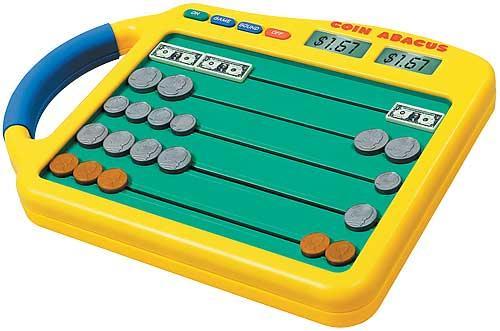
Coin Abacus and Coin-u-lator 

  • Includes keys that are shaped and sized just like real-life coins
  • Designed to teach basic money counting


Teaching Math Concepts, Math Skills, and Problem Solving

The following resources provide opportunities for additional engagement, practice, and instruction to build math concepts, skills, and problem solving. Each program includes features targeted at supporting both general education students, as well as students with disabilities. These applications are designed to make math more accessible for these students.

Math Playground
This is a popular math site filled with games, logic puzzles, step-by-step instructional videos, math practice, and a variety of problem solving activities. This program provides students with a safe place to learn and explore math concepts.


Destination Math
This is a highly interactive web-based learning environment that targets the development of skills in math reasoning, conceptual understanding, and problem solving for students in grade K-12. The program includes step-by-step instruction and opportunities for students to practice their problem solving skills. There is also a Spanish version of Destination Math to support ESL students.


Other math applications to explore:

Addressing Visual-Spatial/Motor Control Difficulties

Students with visual-spatial or motor difficulties may have difficulty with writing numbers, aligning digits when computing problems (adding/subtracting/multiplying, dividing), and/or creating visual representations (shapes, angles, etc). These types of disabilities may result in written work that is illegible, digits written in the wrong place-value position, and unrecognizable geometric figures. Even if these students have developed automaticity and fluency with numbered facts, they may face obstacles at arriving at the correct answer because of visual-spatial and motor difficulties. Below are education applications that address visual-spatial and motor control difficulties:

MathPad
This is a talking math program that allows students to perform basic operations on the computer in the same way as they would when using a pencil and paper.


Virtual Pencil
This application is designed to help students who are unable to operate pencil effectively. The program also offers speech feedback to assist those students with visual impairments and a "tutor" who informs students of what steps still need to bee completed to solve a problem.

Number Navigator 
This free program is for students who need a simple math processor to create mathematical equations. Students are able to enter and solve basic math problems on the computer.

Educational Applications to Address Automaticity/Math Fact Fluency

During my mathematics instruction, I have found that some of my students continue to struggle with math automaticity and fluency. Knowing math facts is similar to knowing sight words when reading. It frees up the mind to be able to solve real-world math problems. When students are not able to solve basic math facts quickly and with ease, they have difficulty solving higher-level math concepts. Following are some educational applications that I would like to incorporate during my math instruction that can strengthen student automaticity and fact fluency.

FASTT Math
This intervention program enhances math fact fluency so that students can focus on building high-level thinking skills.

Times Attack
This program focuses solely on teaching multiplication facts, specifically the 2-12 times tables in a high-tech video game environment.

The ArithmAttack
This technology resource allows students to practice basic addition, subtraction, division, and multiplication facts. Problems can be customized to fit each students particular area of need.

Arcademic Skill Builder
This educational site offers math games designed to develop automaticity in addition, subtraction, multiplication, division, integers, fractions, and ratios.

Selecting Educational Applications to Meet Student Goals/Objectives

When deciding which educational applications would be best suited for students, it is important that the teacher selects these applications based on student needs. The learning activities need to fit instructional goals and/or objectives and the interests of the students. They should never be a forced fit, but rather a match to student IEP goals in order to keep them on track with the curriculum.

When selecting educational applications to meet student goals and objectives, the following key questions should be considered:

  • What is the intended outcome of the use of the educational application?
  • Is the educational application likely to fulfill its purpose?
  • Can the educational applications be used as an alternative to traditional classroom activities to enhance participation?

Friday, December 5, 2014

AT Support for Math

Throughout my last few posts, I focused on assistive technology support for reading and writing. I included many helpful tools and devices to assist students in their reading and writing abilities. My focus will now switch from AT support in literacy to AT support in math. Feel free to use any of the above resources during your classroom instruction!